Have you tried Google search box on your blog? For most blogger, adding such feature is just a waste of space on their blogs. Although you can earn through it, but it's not that effective if your blog is not that popular as the A-list bloggers like John Chow and ShoeMoney. Anyway, if you still like having one for your own blog, then try Blogbar.
Blogbar is a free widget developed in exchange for the typical search box we see on websites and blogs. Putting one on your own blog or website will allow your visitors to search your own webpages, search the web and the blogosphere with major blog search engines. Naturally adding cool service for the visitor's convenience. The widget is available on different themes and styles. Choose from the basic colors or try the themed templates like corporate, aqua, jungle or Mac OS. Aside from that you can choose the language you prefer to use, defining the same language that the search engines will provide.
Blogbar sample widget: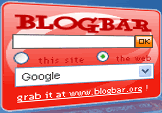
Blogbar is more than just a search box, it can also deliver your microblogging activity directly to your blog or website. You have the choice to enable this feature if you have an account on either Twitter, Jaiku, Pownce or Poodz. Everytime a visitor pointed the cursor below the Blogbar, the latest message on your microblog account will show up. So your visitors will be updated of your current activity at the moment. This feature, however, will only work if your microblog is open to the public.
Other available search box themes: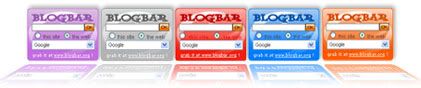
Perhaps the best thing I like about Blogbar is that you can insert Adsense code on it. That means the owner of the blog can still earn revenue if somebody use the Google search engine and click on the ads available. This is not a profit sharing scheme, so Blogbar has no shares of the revenue that the Adsense code owner has earned. Definitely, a great way to monitize your search box with 100% earnings returned.
So if you want a nice looking search box on your own blog, then don't hesitate to use Blogbar for a change.
Summary:
1) There is no need to sign-up to get this free widget.
2) Just follow the 4 simple steps and you can have your own Blogbar widget in minutes.
3) You can enable your microblogging program if you want too.
4) Earn from your Adsense account with this dynamic search box.
5) Get the code and paste it on your blog or websites.
4/29/08
 Get Your Own Search Box Widget with Blogbar

4/25/08
Create Your Own Sitemap with Nomao
Have you tried Google Earth? The program developed by the Google several years ago, that displays maps and sattelite view of the world from above. Even now, I'm still amazed of what it can do and how it changed the whole life of people who already tried it. This kind of innovation from 'do no evil' company, made the world smaller than what we think of it before. Anyway, I found a program called Nomao, that used this innovation on a different way.
Nomao is a free social network program that lets you interact with other users using the Google Earth interface. How does it work? Simply by locating your favorite places on the map. To get started, you need to locate on the map your country, city and exact location. Then you are given the option to place icons that will spot your favorite places. You have to identify also the nature of these places from different available categories like shopping, personal place, dining, night life, your home and others. What I like more, is that you can add descriptions on this marked icons. So your visitors will know a lot about your neighborhood, your lifestyle and everything you want to share to others. It's a way to express your self better and show to your friends, what is life like around you.


Another great feature of Nomao is the event organizer, where you can notify everbody for the event that may takes place near you. Spreading the word to your friends is as easy as click away from your computer. Nomao will ask about 'what, where, when' the event may takes place. So make it a habit to check your friend's pages to get updated on the current happenings nearby. You'll never know, if other people in your neighborhood may have organized a party, games, reunion, meeting or other events that may interest you.
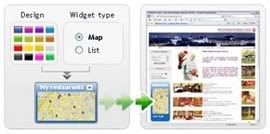
After you spotted all your favorite places you can share your own sitemap to your friends and other members of Nomao. You can put it on your blog too if you want. Nomao provides a highly costumizable widget available on different frame colors and you can edit it on your own preferred sizes. You can either place it on any side of your blog or better, put it on your own sitemap and profile page.
Tired of your old social network program? Try Nomao for a change and see the difference.
Summary:
1) To get started you need an account on Nomao's free service.
2) Spot your locations with Google Earth interface.
3) Organize an event with Nomao's built-in event organizer.
4) Share your sitemap to your friends and other members.
5) Upload your map on your blog.
12/5/07
Boost Your Traffic With Entrecard Program
It's just a matter of luck that I ended up on a site that drives load of traffic on my blog. When I was reading and browsing John Chow dot com, a small ad captured my attention and click it to see something good out of it. Well, I guess luck is sticking on my back on that moment because it led me to one of the best traffic booster I've tried so far. Entrecard really works!
Entrecard is a newly launched program that targets blog traffic to its members by sharing advertisements from one blog to another. It was designed to help both small and big names on blogging and they're serving it for free. Some of the big guys already joined, like blogging top earner John Chow, 'mr. moo' John Cow and Problogger.net. By placing Entrecard Widget on your blog you can start a blog ad swapping. How does it works? Simply by having other people's blog ads (the ad format of the blog and not contextual advertisements like Adsense) to be featured on it. The blog of your advertiser has a direct link to his own blog URL. Whenever somebody clicked it, that will directly send him to that owner's blog. So you are having a win-to-win situation with other party.
Entrecard uses credits as the currency of the network. It used to buy advertisement space on other blogger's Entrecard. There are 3 ways to get credits in this program: One is when you drop 1 credit on someone else. Second is when somebody will drop their credit to your card. Lastly, is when someone buy advertisement space on your Entrecard widget. Remember that this program is 100% free and credits has no monetary value or whatsoever.
I've tried it for two days and Im still amazed with the results (sounds like Im having a commercial for diet pills). Im having more traffic 3 times than my average per day. Can you believe it? Well, after I checked my Adsense pageviews I fell on my seat in disbelief. Got the picture?! Good, now your learning from your photography lesson.
Summary:
1) Put your own Entrecard to initiate this program in your blog.
2) Advertise other blogger's ad in your own Entrecard space.
3) Earn credits in three simple ways.
4) Have fun clicking other's blog in Entrecard network.
5) Enjoy more traffic you're having than the usual.
12/4/07
Increase Your Visitors Activity with PostReach Widget
We all know that one factor that affects our traffic is by putting a comment box on the blog. You usually see this feature just below your posts asking for some personal data like your name, email and url. Using this, will likely pull your visitors to keep coming back. It's a useful tool indeed for driving more viewers and readers. If you had one in your blog that's a good choice, but I think it will be much better if you had a PostReach widget too. It's a cool device that let your visitors rank your article after reading its content.
Small, attractive and very easy to use, PostReach can be a great add-on on your blog. There are several reasons why I encourage you to use it. One, is that it has a very good design and looks professional. That will add aesthetic points from your viewers impression. Second, is that there is no catch on it, no hidden fees nor anything you need to do in return for their service. Third, it can be a good way to promote your related articles from your blog. It has a feature that will provide links from other entries you had. No links outside your blog, however, will be redirected. So people can search more from your own posts only. Fourth, there are three types of design to choose from, plus you can decide if you use the 2D or 3D icons. Lastly, the code is easy to install with just 3-clicks installment feature for Blogger and Typepad users, but other blog hosts like WordPress are also compatible with the widget.
You think PostReach widget is cool? Well I think it's hot too! Trust me.
Summary:
1) Get a cool widget that will add activity to your blog's visitors.
2) Choose your own style from three available designs.
3) You can select from 2d or 3d icons that will appear on your PostReach.
4) Install it in seconds from dozen of blog host it supported.
11/30/07
Increase Blog Traffic with FeedBurner
If you're a blogger and you are dying to find a good way to advertise your blog on the web but still had a hard time finding one, then consider to use feeds. Feeds are dynamic programs that cycle your blog to other people who are interested to read your posts. Having one in your blog, will not only increase traffic but also let other bloggers to subscribe your contents. Isn't it better than advertising your it by word of the mouth? Or worst by pulling your friends to read your works and force them to put comment on it?
I have tried other feeds but nothing amazed me that much other than FeedBurner. It is a new acquired website of Google that can distribute your blogs anywhere in the blogosphere. Affiliated to large established media brands like Wired News, Wall Street Journal Online, MacWorld, PCmag.com and more, makes them one of the best on their fields.
Features:
Join Feedburner and get burned with their huge archives of features. One of it is Pingshot, that can automatically notify directories and aggregators when you publish new content in your feed. This can help you deliver new entries from your blog to update your subscribers and readers. Another one is Chicklet Chooser, that will give you codes from more than 20 available feeds like Google Reader, My Yahoo! , Newsgator and Bloglines. You can also give your subscribers easy ways to email, tag, share, and act on the content you publish by activating the Feedflare. Perhaps my favorite feature on my FeedBurner account is their FeedStat Dashboard. On this page, you can see your blog statistics as if your just counting how many visitors you had since your last check. Live stats records how many subscribers you had, checks your outcoming and outgoing links, plus showing your visitors' locations and feeds they used. It's a great way to view the whole activity of your blog from this excellent tracker.
Having enough yet? Well, that's not all what Feedburner can offer. There are more features to see, just check the site or join to enjoy the whole program for free. I know you're going to love it.
Summary:
1) Put feeds on your blog to increase your visitors.
2) Let your blog be published to FeedBurner's established media affiliates.
3) Get connected from different feed's host like Google Reader and Rojo.
4) See how many subcribers you had and check your online stats.
5) Enjoy more free features to drive traffic and increase blog recognition.

 .
.